

Give your couple photo the feel of a royal portrait in timeless black and white. These five prompts place Indian couples within palace inspired frames while keeping their real faces, hair, expressions, outfits, and natural skin detail intact. Choose your favorite setting, upload your photo, and create a vertical portrait ready to share.
What this prompt does
- Adds a distinct royal architectural frame around the couple.
- Creates a realistic black-and-white photographic finish while preserving natural skin texture.
- Formats the edited photo as a vertical 9:16 portrait.
Tips for this prompt
- Start with a clear photo where both faces are visible and in focus.
- Choose a prompt whose framing suits the couple’s existing pose.
- If the edit changes a face or hand, regenerate it and emphasize the preservation instructions.
How to use the prompt
- Upload your own couple photo to an AI photo editor that supports image editing.
- Copy and paste one of the five prompts above.
- Check both identities and the 9:16 crop before saving or posting.
Black-and-White Royal Frame: 5 Photo Editing Prompts for Indian Couples
Upload one photo of the couple, then copy and paste one prompt. Each prompt keeps the people recognizable while creating a different royal portrait setting.
1. The Carved Palace Arch
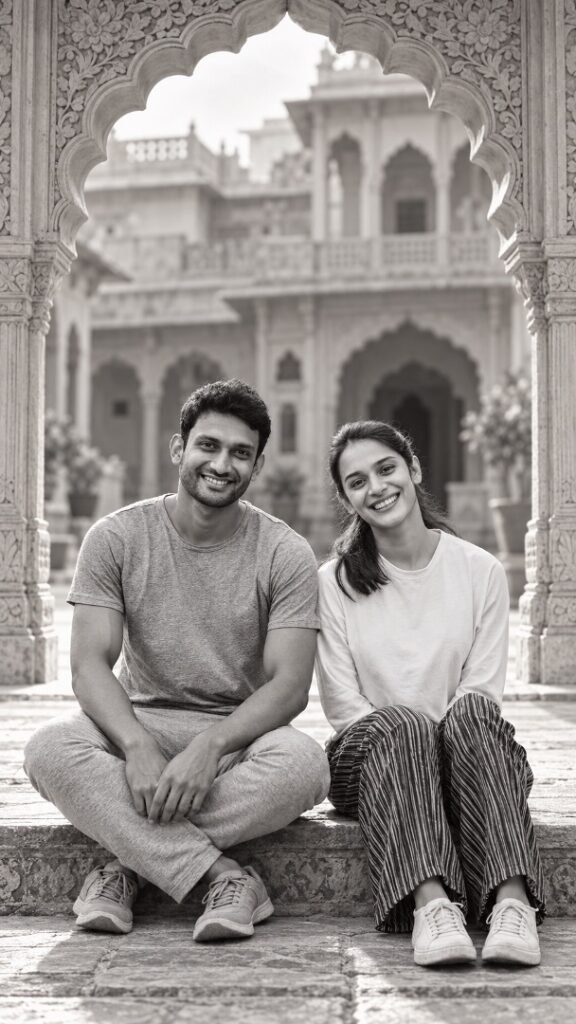
Edit the uploaded photo of this Indian couple into a realistic black-and-white portrait beneath an intricately carved Rajasthani palace arch. Keep both people exactly recognizable: preserve their faces, facial features, expressions, hair, hairlines, facial hair, body proportions, pose, and clothing from the original photo. Let the arch form a natural frame around them, with subtle stone carvings visible at the edges and a softly lit palace courtyard behind them. Match the original camera angle and add believable contact shadows so they belong in the setting. Render skin with natural texture and lifelike tonal variation—no smoothing or artificial glow. Use controlled contrast and fine photographic grain for the look of a professionally shot portrait. Deliver a vertical 9:16 image; extend the surroundings if needed to avoid cropping either person.
2. The Jharokha Portrait

Turn the uploaded photo of this Indian couple into a black-and-white royal portrait framed by a traditional jharokha window. Preserve both identities precisely, including their faces, expressions, hair, facial hair, skin texture, pose, hands, proportions, and original outfits. Place the couple within the window opening, adapting the architecture to their existing position rather than changing how they stand or sit. Show carved stone borders, a restrained glimpse of palace architecture beyond, and soft daylight falling naturally across their faces. Keep realistic skin detail and a full range of grayscale tones; avoid porcelain skin, harsh cutout edges, and exaggerated background blur. Make the result feel like a photograph taken by a professional portrait photographer. Compose at 9:16 without cutting off faces or important parts of their pose.
3. The Royal Gallery Frame

Create a realistic black-and-white editorial portrait of the Indian couple in the uploaded photo, surrounded by the deep, ornamental molding of a historic royal gallery doorway. Keep the couple’s actual faces, expressions, hair, facial hair, body shapes, pose, hands, and clothing unchanged. Use the doorway as a strong frame within the vertical image, with symmetrical wall panels and a dim gallery receding behind them. Light them as if photographed on location: soft directional light, credible shadows, and detail in both dark fabric and bright skin highlights. Preserve natural pores and skin texture, with no beauty filter or AI-style facial reconstruction. Add only subtle film grain. Output a professionally composed 9:16 portrait, extending the background where necessary.
4. The Palace Mirror Frame

Edit the uploaded Indian couple photo into an elegant black-and-white portrait bordered by a large antique palace mirror frame. The couple should appear in front of the mirror frame as real photographed subjects, not as a distorted reflection. Preserve their exact identities, facial details, expressions, hairstyles, facial hair, natural skin texture, proportions, pose, hands, and original clothes. Use the frame’s carved floral details to surround the couple without covering either face. Keep the room behind them understated: aged plaster, gentle window light, and realistic depth. Maintain natural grayscale skin tones with fine detail and restrained retouching; avoid glossy skin, warped anatomy, and overly dramatic effects. Give the finished photograph a refined professional portrait look in a vertical 9:16 composition.
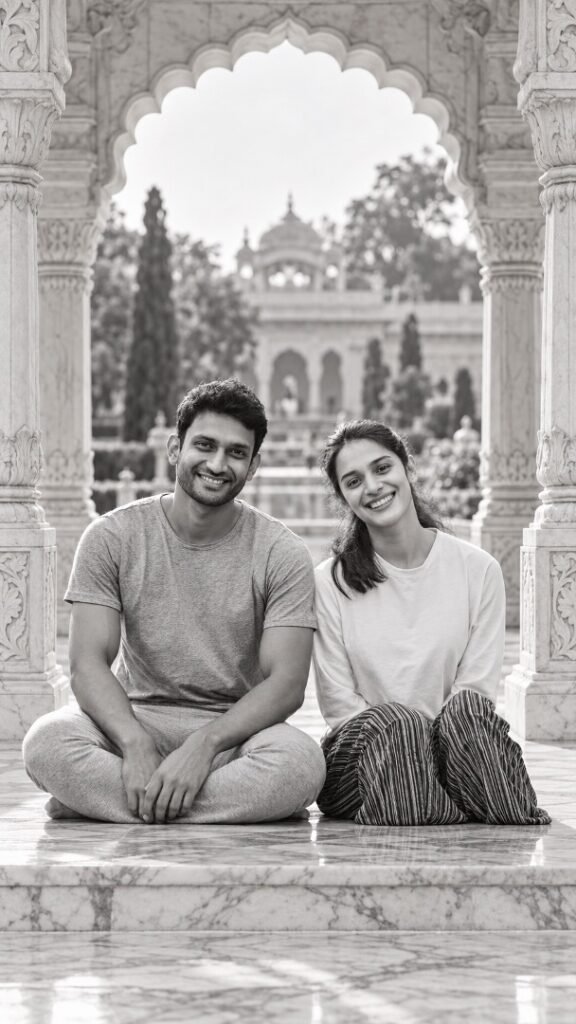
5. The Marble Pavilion Frame
Transform the uploaded photo of this Indian couple into a lifelike black-and-white portrait at a royal marble pavilion. Preserve both people exactly as photographed—their identities, faces, expressions, hair, facial hair, natural skin texture, body proportions, pose, hands, and clothing. Frame them between two carved marble columns, with a scalloped arch above and a softly visible palace garden in the distance. Adapt the pavilion’s perspective and lighting to the original photo so the couple does not look pasted into a new background. Use soft outdoor light, believable shadows, crisp facial detail, and rich but natural monochrome tones. Avoid skin smoothing, invented accessories, or changes to either person. Finish as a professional vertical 9:16 photograph, extending the scene instead of cropping the couple.